

Affiliate Disclosure: BuildWithPC is reader-supported. When you purchase through links on our site, we may earn an affiliate commission at no additional cost to you. Our reviews and recommendations are always honest and independent.
Best Motherboard Under 10000 is the ideal price range for budget gamers and PC builders in 2026. At this price point, both Intel and AMD platforms offer modern chipsets with PCIe 4.0, DDR4/DDR5 support, M.2 NVMe slots, and built-in WiFi — giving you everything you need for gaming, productivity, and future upgrades without overspending.
This guide covers the top Intel and AMD motherboard picks under ₹10,000, a full Intel vs AMD platform comparison, chipset buying advice, and a complete comparison table — so you can choose the right board for your CPU with confidence.
1: What to Expect from the Best Motherboard Under 10000 in 2026
In 2026, the best motherboard under 10000 supports chipsets like B760, H610, H510 for Intel and B650, B550, B450 for AMD. You get PCIe 4.0, at least one M.2 NVMe slot, and DDR4 or DDR5 memory depending on chipset. Many models include built-in WiFi and Bluetooth. These boards are ideal for 1080p/1440p gaming, casual streaming, productivity, and everyday computing.
2: Best Motherboard Under 10000 — Top Picks (2026)
2.1: ASUS B760M-AYW WiFi (Intel LGA 1700)
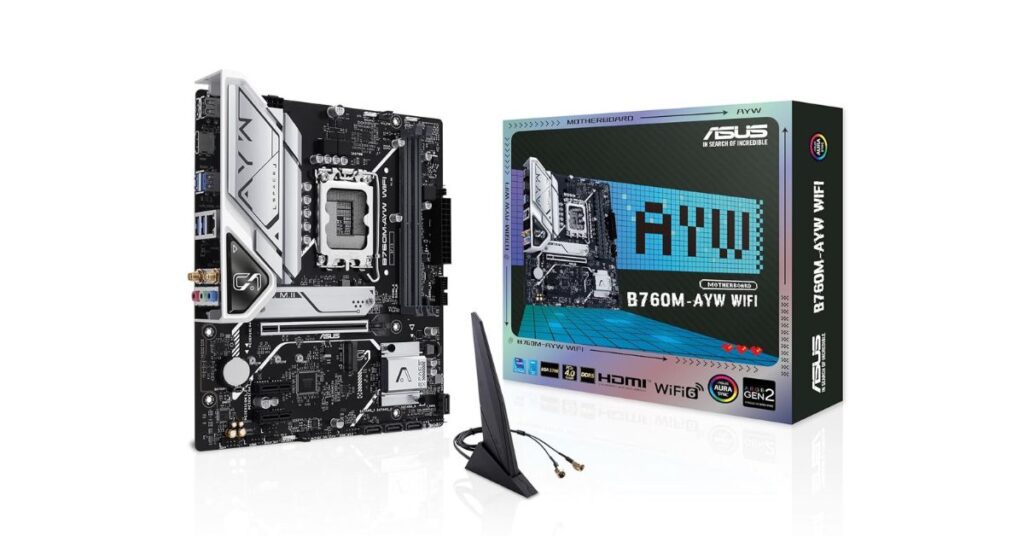
The ASUS B760M-AYW WiFi is our top Intel pick — a modern B760 mATX board supporting 12th–14th Gen CPUs with DDR5, dual PCIe 4.0 M.2 slots, WiFi 6, and 2.5Gb LAN. Exceptional upgrade path for future Intel generations.
| Feature | Details |
|---|---|
| Socket | LGA 1700 |
| Chipset | Intel B760 |
| Memory | DDR5 |
| Storage | 2× PCIe 4.0 M.2 |
| Network | WiFi 6, 2.5Gb LAN |
| Form Factor | mATX |
2.2: ASRock B760M-HDV/M.2 (Intel LGA 1700)

A value-focused Intel B760 board with DDR5, M.2 NVMe, and support for 12th–14th Gen CPUs. Excellent for first-time builders who want DDR5 future-readiness at the lowest possible entry price. No WiFi, but solid wired LAN.
| Feature | Details |
|---|---|
| Socket | LGA 1700 |
| Chipset | Intel B760 |
| Memory | DDR5 |
| Storage | M.2 + SATA |
| Network | 1Gb LAN (no WiFi) |
| Form Factor | mATX |
2.3: MSI PRO B760M-E (Intel LGA 1700)
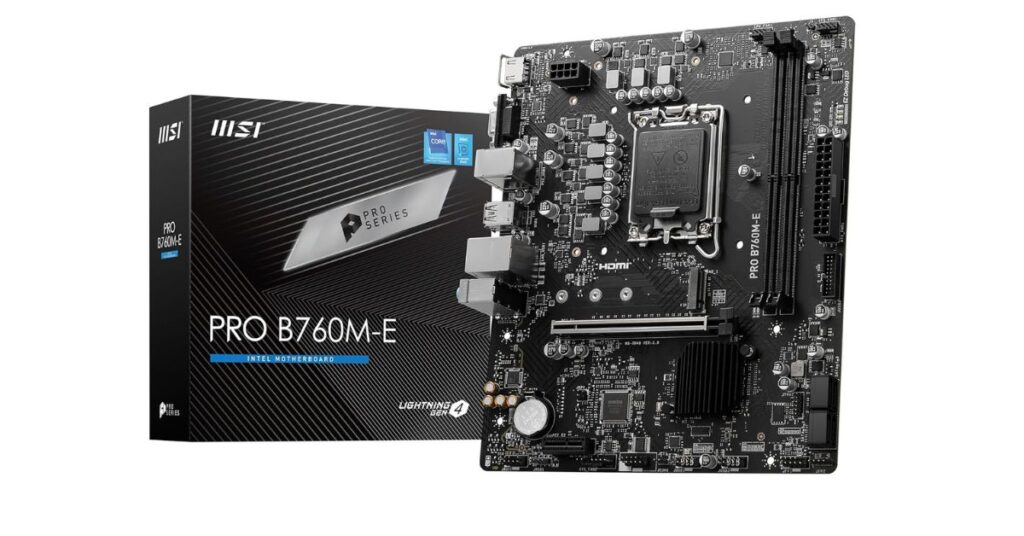
Value-focused Intel B760 mATX for 12th–14th Gen with DDR5 up to 5600MHz and M.2 Gen4 storage. Best DDR5 price-to-performance ratio in this budget. No built-in WiFi — use a PCIe WiFi card if needed.
| Feature | Details |
|---|---|
| Socket | LGA 1700 |
| Chipset | Intel B760 |
| Memory | DDR5 up to 5600MHz |
| Storage | M.2 Gen4 |
| Form Factor | mATX |
2.4: ASUS Prime H610M-E D4-CSM (Intel LGA 1700)

ASUS’s Commercial Stable Model H610 board — built for long-term stability over performance headlines. DDR4, 2× M.2 slots, PCIe 4.0, and essential connectivity. Best pick for office builds, first-time budget gamers, and anyone who needs Intel reliability at the lowest price point.
| Feature | Details |
|---|---|
| Socket | LGA 1700 |
| Chipset | Intel H610 |
| Memory | DDR4 |
| Storage | 2× M.2 slots |
| Network | HDMI, DisplayPort, 1Gb LAN |
2.5: MSI B550M PRO-VDH WiFi (AMD AM4)
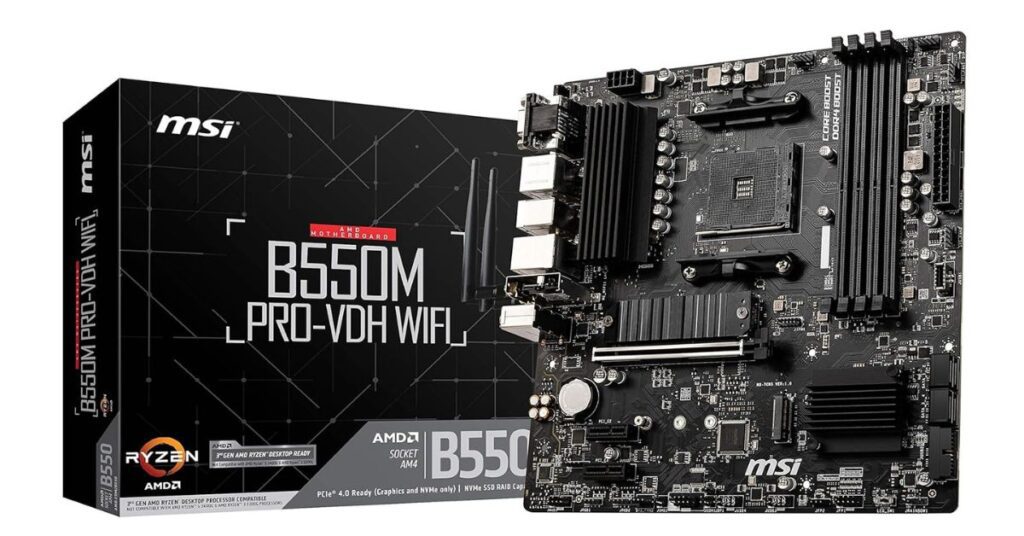
Top AMD pick for AM4 builders. Supports Ryzen 3000 and 5000 series, PCIe 4.0 M.2 with heatsink, built-in WiFi, and solid DDR4 performance. Best option for anyone already on the Ryzen ecosystem or wanting proven AM4 platform stability.
| Feature | Details |
|---|---|
| Socket | AM4 |
| Chipset | AMD B550 |
| Memory | DDR4 |
| Storage | PCIe 4.0 M.2 with heatsink |
| Network | Built-in WiFi, Gigabit LAN |
2.6: MSI B650M Bomber WiFi (AMD AM5)
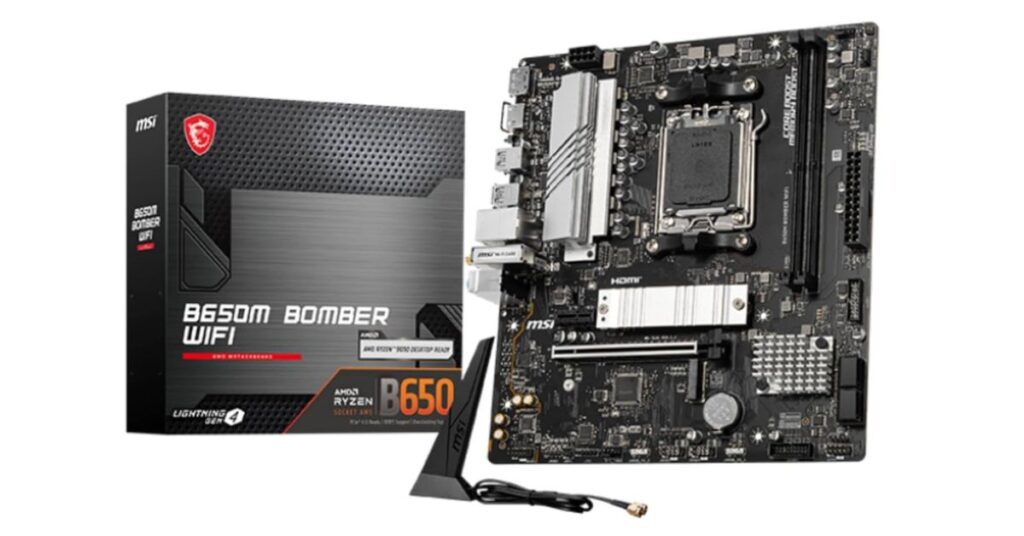
Future-ready AMD AM5 board for Ryzen 7000/8000/9000 series with DDR5 up to 7800+ MT/s (OC), PCIe 4.0, M.2 Gen4, and built-in WiFi. If you’re building a new AMD system and want maximum upgrade headroom, this is the one.
| Feature | Details |
|---|---|
| Socket | AM5 |
| Memory | DDR5 up to 7800+ MT/s (OC) |
| Storage | M.2 Gen4 |
| Network | Built-in WiFi, LAN |
2.7: Gigabyte B450M DS3H WiFi (AMD AM4)
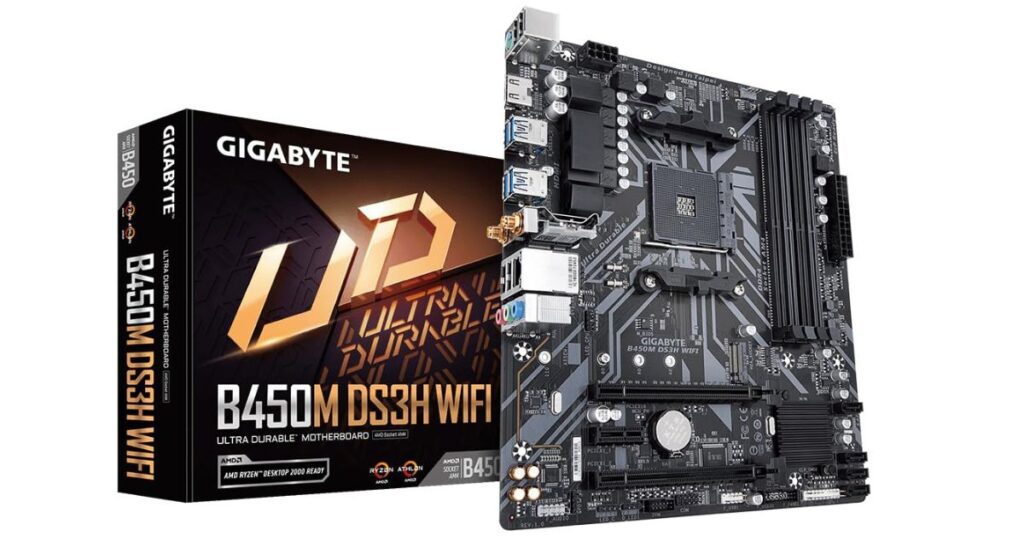
Proven AM4 reliability with built-in WiFi and Bluetooth — ideal for Ryzen builds where connectivity matters and budget is tight. RGB Fusion 2.0 included. Best for legacy Ryzen builds and users upgrading from older platforms.
| Feature | Details |
|---|---|
| Socket | AM4 |
| Chipset | AMD B450 |
| Memory | DDR4 |
| Storage | PCIe Gen3 M.2 |
| Network | WiFi + Bluetooth, Gigabit LAN |
2.8: MSI PRO H510M-B (Intel LGA 1200 — Legacy/Upgrade Builds)

For builders upgrading an existing Intel 10th Gen (LGA1200) system, this is the most stable budget option. PCIe 3.0, DDR4, USB 3.2 Gen1, and MSI’s reliable build quality. Not recommended for new builds in 2026 — but the right pick if you’re keeping your 10th Gen CPU.
| Feature | Details |
|---|---|
| Socket | LGA 1200 |
| Chipset | Intel H510 |
| Memory | DDR4 |
| Expansion | PCIe 3.0 x16 |
| Network | 1Gb LAN |
3: Full Comparison Table — All 8 Picks
| Model | Platform | Chipset | Memory | PCIe | WiFi | Best For |
|---|---|---|---|---|---|---|
| ASUS B760M-AYW WiFi | Intel LGA1700 | B760 | DDR5 | 4.0 | WiFi 6 | Top Intel DDR5 pick with WiFi |
| ASRock B760M-HDV/M.2 | Intel LGA1700 | B760 | DDR5 | 4.0 | No | Budget DDR5 Intel, wired only |
| MSI PRO B760M-E | Intel LGA1700 | B760 | DDR5 | 4.0 | No | Best DDR5 value for Intel |
| ASUS Prime H610M-E D4-CSM | Intel LGA1700 | H610 | DDR4 | 4.0 | No | Stable DDR4 office/budget gaming |
| MSI PRO H510M-B | Intel LGA1200 | H510 | DDR4 | 3.0 | No | Legacy 10th Gen upgrade builds |
| MSI B550M PRO-VDH WiFi | AMD AM4 | B550 | DDR4 | 4.0 | Yes | Top AMD Ryzen DDR4 with WiFi |
| MSI B650M Bomber WiFi | AMD AM5 | B650 | DDR5 | 4.0 | Yes | Future-ready AMD DDR5 with WiFi |
| Gigabyte B450M DS3H WiFi | AMD AM4 | B450 | DDR4 | 3.0 | WiFi+BT | Legacy Ryzen with WiFi & BT |
4: Intel vs AMD — Which Platform Under ₹10,000?
For Intel builds in 2026, the B760 chipset is the clear best choice — it supports 12th, 13th, and 14th Gen CPUs, offers DDR5 and PCIe 4.0, and gives the longest upgrade runway. If you’re on a tighter budget or keeping a 12th/13th Gen CPU with DDR4 RAM, H610 is a solid stable option. The H510 is only worth it if you already own a 10th Gen CPU.
For AMD builds, B550 (AM4) remains the best value if you own a Ryzen 5000 CPU — it’s battle-tested and widely available. If you’re building fresh and want future-proofing, B650 (AM5) supports Ryzen 7000/8000/9000 and DDR5, making it the better long-term investment even at this budget.
| Platform | Best Chipset | Memory | CPU Support | Upgrade Path |
|---|---|---|---|---|
| Intel (new build) | B760 | DDR5 | 12th–14th Gen | Strong (LGA1700) |
| Intel (budget/DDR4) | H610 | DDR4 | 12th–13th Gen | Good |
| Intel (legacy) | H510 | DDR4 | 10th Gen only | None — upgrade soon |
| AMD (existing Ryzen 5000) | B550 (AM4) | DDR4 | Ryzen 3000–5000 | Good (AM4 end-of-life) |
| AMD (new build) | B650 (AM5) | DDR5 | Ryzen 7000–9000 | Excellent (AM5 active) |
5: How to Choose the Best Motherboard Under 10000
Start with socket compatibility — LGA 1700 for Intel 12th–14th Gen, AM4 for existing Ryzen builds, AM5 if building fresh. For memory, DDR4 is the best-value choice today; DDR5 makes sense if you plan to keep the board for 3+ years. Look for WiFi, Bluetooth, and sufficient USB ports. Prioritize solid VRM quality with heatsinks for stable gaming. Always check for BIOS update availability for your CPU from your chosen brand.
6: Common Mistakes to Avoid When Buying a Budget Motherboard
Ignoring CPU compatibility — always confirm socket and chipset match your processor before buying. Skipping BIOS update checks can leave newer CPUs unable to POST on older boards. Buying on wattage or RGB alone — weak VRMs throttle gaming CPUs under sustained load. Overpaying for unused PCIe slots or ports at this budget is common — focus on what you’ll actually use.
7: Conclusion
The best motherboard under 10000 in 2026 depends entirely on your CPU platform. For Intel: go B760 for DDR5 and long-term value, H610 if staying on DDR4. For AMD: B550 for proven AM4 reliability, B650 if building fresh on AM5. The ASUS B760M-AYW WiFi is our top overall pick — it covers Intel’s strongest chipset, DDR5, WiFi 6, and 2.5Gb LAN in one package. For pure AMD value, the MSI B550M PRO-VDH WiFi remains the best budget Ryzen board available.
Also Read: Best Gaming Motherboard Under 5000 | Best ASUS Motherboard Under 30000
8: Frequently Asked Questions (FAQs)
Q1. Which is the best motherboard under 10000 for gaming?
B760 (Intel) and B550 (AMD) motherboards are the best choices under ₹10,000 for gaming — both offer PCIe 4.0, stable VRMs, and support for current-gen CPUs at 1080p and 1440p.
Q2. Is a DDR5 motherboard worth it under 10000?
Yes, if you plan to keep your system for 3+ years. DDR5 boards under ₹10,000 (like the ASUS B760M-AYW and ASRock B760M-HDV) are now available and offer a better long-term upgrade path. For immediate budget builds, DDR4 boards still offer better value today.
Q3. Intel or AMD motherboard — which is better for long-term use?
AMD’s AM5 platform (B650) has a longer active roadmap as of 2026, while Intel’s LGA1700 (B760) is approaching end-of-life. For a new long-term build, AM5 has the edge. For near-term value, B760 Intel is still excellent.
Q4. Which Intel chipset is best under 10000 in 2026?
B760 is the best Intel chipset under ₹10,000 — it supports 12th, 13th, and 14th Gen CPUs and offers DDR5 and PCIe 4.0. H610 is a solid secondary option if you want DDR4 savings. H510 is only suitable for existing 10th Gen systems.
Q5. Can I use future CPUs on a budget motherboard under 10000?
Yes, with limitations. B760 and B650 boards support BIOS updates for newer CPU generations within the same socket. Weak VRMs may limit compatibility with high-TDP CPUs. Always check the manufacturer’s CPU support list before purchasing.
Affiliate Disclosure: BuildWithPC is reader-supported. When you purchase through links on our site, we may earn an affiliate commission at no additional cost to you. Our reviews and recommendations are always honest and independent.