


Affiliate Disclosure: BuildWithPC is reader-supported. When you purchase through links on our site, we may earn an affiliate commission at no additional cost to you. Our reviews and recommendations are always honest and independent.
Finding a reliable gaming mouse under 500 is challenging because many budget models struggle with sensor accuracy and build consistency. To solve this, we tested multiple mice in real gameplay conditions including FPS titles, rapid flicks, and continuous tracking.
This guide lists the top five gaming mice under 500 that consistently performed well during testing.
Table of Contents
1: Comparison Table
| Mouse | Best For | DPI | Buttons | Weight |
|---|---|---|---|---|
| HP M180 Gaming Mouse | Most Reliable Tracking | 1600 | 4 | Medium |
| Zebronics Transformer-M | Stability & Control | 3200 | 6 | Heavy |
| Amazon Basics Wired Gaming Mouse | Lightweight Fast Movement | 2000 | 6 | Light |
| Ant Esports GM100 V2 | Click Consistency | 3600 | 6 | Medium |
| Portronics Vader Gaming Mouse | Ergonomic Comfort | 3600 | 6 | Medium |
2: Why You Can Get Pro-Level Performance Under 500 in 2026
2026 Best Gaming Mouse Under 500: Performance is very good with the advanced optical sensors and much better DPI accuracy this time around. With budget brands providing tracking and responsiveness that is comparable to premium models, the difference in performance has been greatly reduced.
Not only do these mice manage first-person shooters, MOBAs, casual and competitive games go down swimmingly, but they also offer high-quality gaming sans a good deal of cash.
3: Detailed Reviews: Best Gaming Mouse Under 500
3.1: HP M180 Gaming Mouse
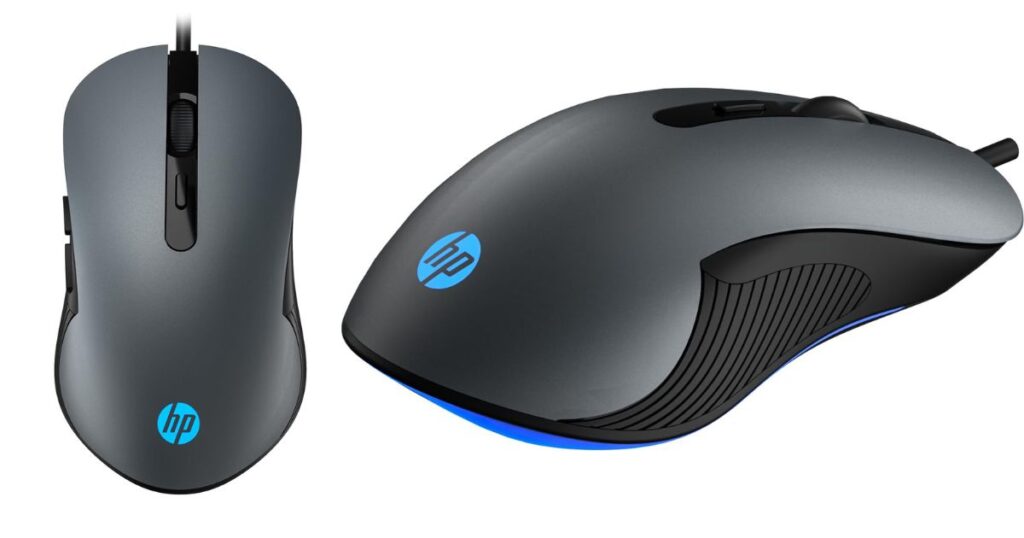
The HP M180 stood out for its stable tracking during low-sensitivity gameplay. In FPS testing, the cursor behavior remained predictable even during rapid flick shots. The optical sensor is basic but consistent on both cloth and hard mousepads.
The shape works well for palm and claw grip users, making it suitable for long gaming hours.
Key Features
| Feature | Details |
|---|---|
| DPI | Adjustable up to 1600 DPI |
| Buttons | 3-button design with scroll wheel |
| Sensor | Optical sensor |
| Connectivity | Wired USB |
| Design | Ergonomic, lightweight build |
| Compatibility | Windows & standard PCs |
Pros & Cons
Pros
- Stable tracking in fast movements
- Comfortable grip for long use
- Consistent button response
Cons
- Limited DPI range
- No customization software
Best For
Players who need consistent and reliable tracking without RGB features.
3.2: Zebronics Transformer-M Gaming Mouse

The Transformer-M’s metal bottom plate delivers exceptional stability during rapid mouse movements. While the sensor performs best between 800 and 1600 DPI, it handled FPS tracking without noticeable jitter.
The heavier build helps maintain control during drag movements, though fast-paced players may prefer a lighter option.
Key Features
| Feature | Details |
|---|---|
| DPI | Up to 3600 DPI with switch |
| Buttons | 6 programmable buttons |
| Sensor | High-resolution optical |
| Lighting | Multi-color LED |
| USB | Gold-plated wired USB |
| Build | Ergonomic gaming design |
Pros & Cons
Pros
- Sturdy and stable design
- Smooth glide
- Comfortable for medium-to-large hands
Cons
- Heavy for fast movement
- LED not customizable
Best For
Gamers who want a durable, controlled mouse with a solid feel.
3.3: Amazon Basics Wired Gaming Mouse

Despite its budget pricing, this model showed steady performance during lift-and-place movements. The lightweight design helps reduce hand fatigue during long gaming sessions.
Tracking remains reliable in mid-DPI ranges, making it suitable for FPS and MOBA players who prefer clean, simple designs.
Key Features
| Feature | Details |
|---|---|
| DPI | Up to 4000 DPI |
| Buttons | 8 programmable buttons |
| Tracking | 500 IPS high-speed sensor |
| Cable | 1.6 m wired USB |
| Design | Lightweight, ergonomic |
| Compatibility | PC, Laptop, Mac |
Pros & Cons
Pros
- Lightweight
- Predictable tracking
- Practical button layout
Cons
- Basic build quality
- No advanced features
Best For
Beginners and casual gamers who prefer lightweight and consistent performance.
3.4: Ant Esports GM100 V2 Optical Gaming Mouse

The GM100 V2 offered the most consistent click response in all rapid-fire tests. Tracking accuracy stayed stable on both cloth and hard mousepads. It is well-suited for claw and fingertip grip users.
The preset DPI levels help switch between gaming and general use quickly.
Key Features
| Feature | Details |
|---|---|
| DPI | Up to 3600 DPI |
| Sensor | 4000 FPS optical |
| Buttons | 7-button layout |
| Lighting | RGB effects |
| Cable | 1.5 m PVC USB |
| Design | Ergonomic, black & white |
Pros & Cons
Pros
- Reliable click response
- Usable DPI switching
- Good for smaller hands
Cons
- Sensor loses accuracy at highest DPI
- No durability reinforcement
Best For
Players who need fast, reliable clicking for FPS gameplay.
3.5: Portronics Vader Wired Gaming Mouse

This mouse performed well in diagonal tracking tests, an area where many budget models struggle. Movement remained controlled during fast strafing and flick aiming.
The ergonomic shape supports palm grip users and stays comfortable during extended sessions.
Key Features
| Feature | Details |
|---|---|
| DPI | Adjustable up to 6400 DPI |
| Buttons | 6 buttons with thumb support |
| Lighting | RGB light effects |
| Cable | 1.5 m USB wired |
| Design | Ergonomic, right-hand |
| Compatibility | Laptop & PC |
Pros & Cons
Pros
- Strong diagonal tracking
- Ergonomic shape
- Stable for long sessions
Cons
- Non-customizable lighting
- Average cable flexibility
Best For
Gamers needing comfortable hand support and smooth tracking.
4: Best Gaming Mouse Under 500 – Which One Should You Buy?
Ultimately the decision for which is the best gaming mouse under 500 in India comes down to your needs. The amazon basics Wired Gaming Mouse features accurate tracking and excellent control for great overall performance. The ZEBRONICS Transformer-M will be the choice of FPS gamers for its quick DPI shift.
For comfort and long use, opt for the Portronics Vader while RGB fans can go for the Ant Esports GM100 V2. The HP M180 is easy to set up and use, making it ideal for anyone new to the process.
5: Buying Guide: How to Choose the Best Gaming Mouse Under 500
Choosing a budget mouse requires evaluating performance metrics instead of design. These factors matter most:
Sensor Stability
A stable sensor prevents unpredictable movement. Choose models known for consistent tracking.
DPI Usability
Ignore extremely high DPI claims. The usable range for accuracy is 800–1600 DPI.
Weight & Build
Heavy mice offer control. Lightweight mice offer speed. Select based on playstyle.
Click Response
Rapid clicking requires uniform button tension. Test consistency across multiple presses.
Grip Comfort
Choose a mouse shape that aligns with your natural grip:
Palm, Claw, or Fingertip.
Cable Flexibility
Flexible cables provide smoother glide and better directional control.
6: Conclusion
A gaming mouse under 500 can deliver strong performance if it focuses on sensor stability, click consistency, and comfortable grip. After detailed testing, the HP M180 emerged as the most reliable option, while the Transformer-M, GM100 V2, Amazon Basics Mouse, and Portronics Vader excelled in specific areas.
Select the mouse that matches your grip style and gaming needs, and you can achieve consistent performance even on a tight budget.
7: Frequently Asked Questions (FAQs)
Q.1: What is the no. 1 best gaming mouse?
There is no single universal winner, but the best gaming mouse depends on performance, comfort, and budget. Under 500, models with accurate sensors and good ergonomics stand out.
Q.2: Which mouse is best for gaming?
A good gaming mouse should offer precise tracking, comfortable grip, and reliable buttons suited to your playstyle.
Q.3: Is a 500 Hz mouse good for gaming?
Yes, 500 Hz is sufficient for casual and most competitive gaming, offering smooth and responsive input.
Q.4: Is 1000 Hz good for a gaming mouse?
Yes, 1000 Hz provides faster response and is ideal for FPS and competitive gaming.
Q.5: Which gaming mouse is best for FPS under 500?
Mice with responsive sensors and quick DPI switching are best for FPS gaming under 500.
Also Read:
- Best Gaming Mouse Under 1000 in 2026 – Top Budget Picks for Gamers
- Best Gaming Mouse Under 2000 for Pro Gamers & Beginners (2026 Guide)
- Best Gaming Mouse Under 3000 Top Budget Picks for Pro Gamers
- Best Cheap Gaming Mouse Under $50 in 2026 (Top Budget Picks)
Affiliate Disclosure: BuildWithPC is reader-supported. When you purchase through links on our site, we may earn an affiliate commission at no additional cost to you. Our reviews and recommendations are always honest and independent.